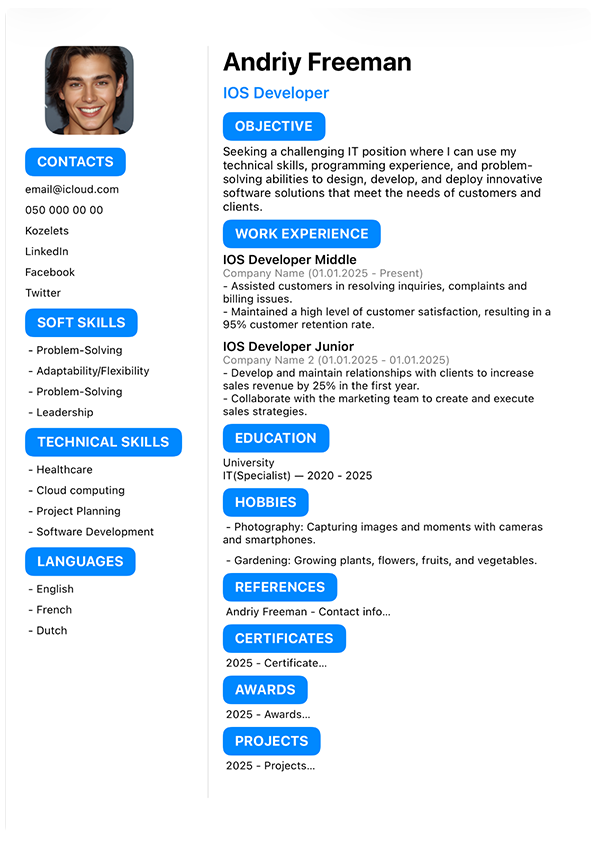
What is the best ATS resume format?
A practical ATS resume format is simple, consistent and easy to understand. Use familiar section headings, readable typography and a clear order so important information is easy to find.
Applicant tracking systems vary between employers, so there is no single resume format that guarantees your application will pass every ATS.
Keep the layout straightforward and focus on clearly presenting your experience, education and relevant skills.
If you're new to applicant tracking systems, read our complete ATS resume guide to learn how ATS software is used in the hiring process.
What sections should an ATS resume include?
Use recognizable section names so the purpose of each part of your resume is immediately clear.
Contact Information
Include your name and appropriate contact details at the beginning of your resume.
Professional Summary or Objective
Use a short introduction when it helps explain your experience, strengths or career direction.
Work Experience
List relevant positions with clear job titles, employers, dates and concise descriptions of your work.
Education
Include relevant education, qualifications and graduation information.
Skills
Add skills that genuinely match your experience and the requirements of the job.
Optional Sections
Certifications, projects, awards, languages or other sections can be useful when relevant to the position.
Need ideas for your skills section? Browse our resume skills examples .
Put the most relevant information first.
There is no single section order that works equally well for every candidate. Your experience level and the role you're applying for should influence what receives the most attention.
For experienced candidates
Contact Information
Professional Summary
Work Experience
Skills
Education
Additional Relevant Sections
For students or first-job candidates
Contact Information
Resume Objective
Education
Skills
Projects / Relevant Experience
Certifications or Activities
The goal is not to follow a rigid formula. Prioritize the information that best demonstrates your suitability for the position.
Keep your resume layout clear.
A straightforward layout creates a predictable reading order and makes your resume easier to review.
Use a clear reading order
Organize sections from top to bottom without making the reader search for important information.
Use columns carefully
Multi-column designs can create a more complex reading order. A simple layout is a practical option when ATS compatibility is a priority.
Don't rely on graphics
Important qualifications should be communicated with text rather than only through icons, charts or visual elements.
Keep spacing consistent
Consistent margins and spacing make sections easier to distinguish and help maintain a professional appearance.
Applicant tracking systems differ. A specific design element does not automatically mean that every ATS will reject or misread a resume. Simpler formatting is mainly a practical way to reduce unnecessary complexity.
Choose a readable resume font.
Typography should help the reader quickly distinguish your name, section headings, job titles and body text.
Common professional fonts such as Arial, Calibri, Helvetica, Georgia and Times New Roman can all provide clear, readable text when used consistently.
Keep font sizes practical
Avoid shrinking text simply to fit more information onto one page. Body text should remain comfortable to read, while headings can be slightly larger to create a clear hierarchy.
Use the same typography rules throughout your resume instead of changing font styles and sizes from section to section.
Format dates and experience consistently.
Work experience is easier to scan when each position follows the same structure.
Project Coordinator — Example Company
January 2023 – September 2026
• Coordinated project schedules across multiple teams.
• Tracked project status and deadlines in Excel.
• Prepared weekly progress reports for stakeholders.
Choose one date style and use it throughout your resume. For example, avoid using “Jan 2023” in one position and “01/2022” in another without a reason.
For more examples, see our guide on how to write work experience on a resume .
PDF or DOCX: which format should you use?
The first rule is simple: follow the employer's instructions. If the application asks for a specific file type, submit your resume in that format.
PDF files are useful for preserving the visual layout of a document across devices. DOCX files are also commonly used in recruiting workflows. The systems and file types supported can vary between employers and platforms.
No file format can guarantee that every ATS will process a resume in exactly the same way. Follow the application requirements whenever they are provided.
Simple ATS resume format example
Here's an example of a straightforward resume structure you can use as a starting point.
YOUR NAME
Phone · Email · Location · LinkedIn
PROFESSIONAL SUMMARY
Short summary focused on relevant
experience and strengths.
WORK EXPERIENCE
Job Title — Company
Month Year – Month Year
• Relevant achievement or responsibility
• Relevant achievement or responsibility
EDUCATION
Degree — School
Graduation Year
SKILLS
Relevant Skill · Relevant Skill · Relevant Skill
ATS resume formatting mistakes to avoid
Don't make important information difficult to locate.
Familiar labels such as Experience, Education and Skills clearly describe what each section contains.
Use a consistent date style throughout your work and education history.
Communicate important skills and qualifications with readable text.
Don't sacrifice readability just to squeeze additional content onto a page.
Use job-related terminology only when it accurately reflects your actual skills and experience.
ATS resume format checklist
Still deciding how much information to include? Read how long a resume should be .